Make an Army Red VS Blue Mobile Guide
Touch controls, gate split timing, UI layout, and battery-friendly sessions for the Roblox beta on phone and tablet.
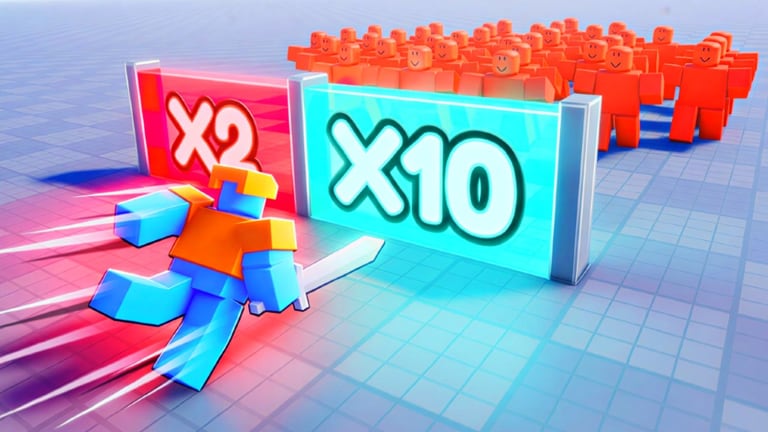
Make an Army : Red VS Blue [Beta] runs on Roblox mobile, and most gate mistakes come from late swipes, not wrong strategy. UH Games Offical built a runner-first experience where you auto-sprint through splits while choosing multiply lanes, coin bursts, and risky shortcuts. Phones add a virtual stick, smaller labels, and occasional frame drops during crowded arena fights.
This guide focuses on touch-specific tactics for the beta (created June 27, 2026; updated August 3, 2026). PC and controller bindings live on Controls—read both if you switch devices mid-week.
Roblox mobile setup before you queue
Spend two minutes in settings before your first run:
- Update the Roblox app to the latest store build—beta UI breaks on old clients.
- Enable shift lock or camera mode you prefer for side-scrolling runners; test in hub first.
- Lower graphics one step if your device heats during five-player lobbies.
- Disable unnecessary overlays (Discord bubbles, screen recorders) that steal touch edges.
- Join on Wi-Fi when claiming Free Egg Tier 1 rewards—Like, Join Group, Favorite sometimes fail on flaky LTE.
Confirm developer UH Games Offical and place ID 121127868367976 before grinding—clone games copy names.
Virtual stick and gate splits
Movement during the runner phase is steer left or right at forks while your character auto-runs forward. Mobile uses an on-screen joystick or drag-to-steer depending on Roblox control preset.
Split timing rules:
- Pre-commit one lane when labels appear—hesitation carries you past the last safe frame.
- Drag early, not hard—small stick nudges beat wild flicks that overshoot.
- Lift thumb before shop menus so accidental movement does not cancel purchases.
- Use both hands—left steers, right taps UI when safe zones pause movement.
Practice opening splits on Gates and Paths routes in solo servers before co-op—see Red vs Blue Strategy for callouts when friends call lanes you cannot read in time.
Reading gate labels on small screens
Multiply (x2, x3, x5), flat troop adds (+N), and coin gates use floating text that shrinks on phones.
Mobile UI tips:
- Zoom camera slightly out in hub if Roblox allows—more label visibility at splits.
- Memorize icon shapes (coins versus soldiers) when text blurrs on low DPI screens.
- Pause mentally at three-way forks—use Gate Path Helper rules: flat under ten troops, multiply mid-run.
- Screenshot confusing gates after patches from Updates Hub and compare on a tablet.
If labels changed after August 2026 refresh, trust live icons over old YouTube shorts filmed on PC.
Shop, upgrade, and menu taps
Between runner segments you buy armor and weapons from Better Army Guide priorities. Mobile shop pain points:
- Mis-taps on narrow rows — zoom UI accessibility if Roblox OS settings offer it.
- Accidental back swipe on iOS—use home-indicator aware grip.
- Delayed purchase confirm — wait for success toast before closing panel.
Spend currency during the same session so you notice if rewards landed in a sub-wallet—same advice as Coins and Gems.
Arena and boss fights on touch
Red vs Blue arena combat is mostly auto-attack, but positioning modes still punish thumb drift. For Beat Bosses like Pharaoh or Emperor:
- Enter portal only when squad count matches co-op agreement.
- Tap targets carefully if manual focus exists—fat fingers hit wrong units.
- Lower graphics before Emperor adds spawn to reduce frame stutter.
Badge hunts from Badges on mobile mean more hub exploration—tap every plausible prop slowly; secret badges like Red Button reward patience.
Battery and session length
Simulation beta sessions run fifteen to thirty minutes for a full route, shop, and boss attempt. Mobile drains faster in five-player servers.
Battery-friendly habits:
- Brightness at fifty percent indoors.
- Airplane mode off but close background apps.
- One full run per charge block instead of endless requeues when below twenty percent.
- Short breaks between Emperor retries—overheat throttling kills split reaction time.
Use Session Checklist pre-run to set one goal per charge (multiply drill, one badge, or coin farm).
Co-op on mobile with PC friends
Mixed lobbies work when PC players call gates early and mobile players confirm with short replies (“got left”). Assign mobile friend to shop role—they can read menus while PC caller handles splits.
Max five players—mute toxic lobbies and requeue if callers refuse sync.
Mobile versus scripts
Do not run executors on phone for this beta place. Scripts violate Roblox Terms of Use, often fail on universe ID 10404766693, and risk account action. Legit gate skill from How to Play beats incompatible loadstrings—see Scripts Hub.
Troubleshooting common mobile issues
Stick dead zones — recalibrate in Roblox settings or reconnect controller if using mobile pad.
Wrong gate despite swipe — network lag; prefer solo test runs after patches.
Egg reward missing — redo Like, Join Group, Favorite on stable Wi-Fi per Free Egg Tier 1.
Codes menu missing — beta UI moves; see Codes Hub—no verified promo strings as of August 2026 anyway.
Recommended mobile learning path
- Controls — compare default binds.
- How to Play — one solo full loop.
- Gates and Paths — opening multiply drill.
- Gate Path Helper — second-screen checklist on tablet browser.
- Red vs Blue Strategy — co-op callouts when ready.
More guides
- Controls — full PC, mobile, and controller reference.
- How to Play — runner loop overview.
- Gates and Paths — route math for touch players.
- Session Checklist — plan mobile-friendly runs.
- Updates Hub — UI changes after beta patches.
Frequently Asked Questions
Quick answers players ask before every match.
Can I play Make an Army Red VS Blue on mobile?
Yes. The Roblox app supports the full beta experience including gates, shop upgrades, and five-player co-op. Use stable Wi-Fi for social rewards.
Why do I keep missing gates on phone?
Usually late swipes or stick overshoot. Pre-commit lanes when labels appear and practice opening splits solo before co-op.
Are mobile controls different from PC?
Same mechanics—virtual stick instead of WASD. See Controls for the full binding list and this guide for touch timing tips.
Does mobile work for boss badges?
Yes, but frame drops during heavy adds can hurt timing. Lower graphics one step and enter boss portals with agreed squad counts.
How long should a mobile session last?
Plan fifteen to thirty minutes per goal—one full run or badge attempt. Stop if device overheats or battery drops below twenty percent.